🔐 Repository Secret Scanning
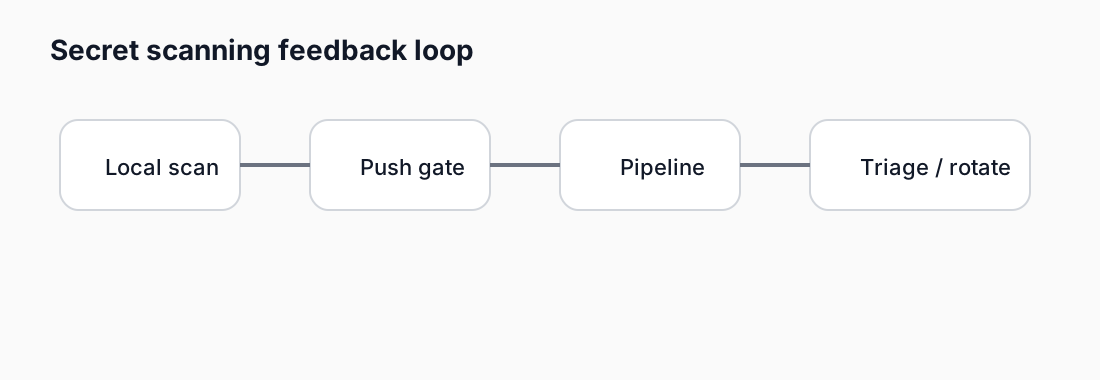
Intro: Secret scanning is one of the fastest-return controls in a Product Security program because leaked credentials regularly become the easiest path to production compromise, cloud abuse, or supply-chain pivoting.
What this page includes
- what repository secret scanning is and why it matters
- a practical top-five tool shortlist
- local, Docker, and CI/CD execution patterns
- sample findings and how to interpret them
- how to connect secret scanning to a release quality gate
Working assumptions
- any committed credential should be treated as exposed until proven otherwise
- revocation and rotation are more important than simply deleting the string from git history
- secret scanning works best as a layered control: local hooks, merge request checks, and platform-side scanning
What repository secret scanning actually does
Repository secret scanning looks for tokens, passwords, private keys, certificates, cloud credentials, webhook signing keys, and other sensitive values in:
- tracked files in the working tree;
- staged changes before commit;
- commit ranges in a branch or merge request;
- full git history when a historic scan is needed;
- artifacts such as Docker images, archives, and generated config.
The goal is not just “find suspicious strings.” The real goal is to reduce the time between secret introduction, secret detection, secret revocation, and pipeline recovery.
Why this matters in practice
A leaked secret is dangerous because it often bypasses exploit complexity. Attackers do not need a memory corruption bug when they can reuse a valid API key, deploy code with a CI token, or laterally move with a cloud access key.
Typical impact paths include:
| Secret type | Example impact |
|---|---|
| Cloud credential | Unauthorized API calls, data exfiltration, crypto-mining, privilege escalation |
| CI token | Pipeline abuse, artifact tampering, malicious releases |
| Registry credential | Pull or push of unauthorized images, poisoning of release lineage |
| SaaS API token | Abuse of GitHub, GitLab, Slack, Jira, Stripe, or internal platforms |
| Private key | Long-lived access, service impersonation, TLS interception risk |
Top 5 tools to evaluate
These five cover most practical Product Security programs well:
| Tool | Best fit | Strengths | Trade-offs |
|---|---|---|---|
| TruffleHog | high-signal repo and filesystem scans | verifies many secret types against providers, strong git + filesystem modes | verification can require outbound access; tuning may be needed |
| Gitleaks | fast local and CI scanning | simple binary, TOML rules, JSON/CSV/SARIF reports, strong pre-commit use | mostly pattern + entropy based; no built-in provider verification model like TruffleHog |
| GitHub Secret Scanning | teams standardized on GitHub | native platform alerts, partner patterns, SARIF ecosystem nearby | strongest inside GitHub-hosted workflow |
| GitLab Secret Detection | teams standardized on GitLab CI/CD | native secret_detection job, MR and vulnerability views, security policy hooks |
best experience requires alignment with GitLab scanning model |
| GitGuardian ggshield | developer-first prevention and CI checks | broad detector coverage, strong UX, pre-commit/CI/path/docker modes | CLI depends on GitGuardian service/API model |
Practical note: these are not mutually exclusive. Many teams use Gitleaks or TruffleHog in developer CI, then rely on GitHub/GitLab platform scanning as an independent safety net.
TruffleHog vs Gitleaks at a glance
| Question | TruffleHog | Gitleaks |
|---|---|---|
| Detection style | regex + detector logic + provider verification where supported | regex + entropy + configurable rules |
| Best “block the merge” mode | verified findings or high-confidence policy | any finding or rule-tag based thresholds |
| Git history support | yes | yes |
| Filesystem scanning | yes | yes |
| Docker usage | straightforward | straightforward |
| Report formats | JSON-oriented workflows | JSON / CSV / SARIF |
| Best use | reduce false positives with verified results | fast, deterministic, portable secret gates |
See also: 🔎 TruffleHog and Gitleaks Deep Dive.
Local execution from an admin workstation
TruffleHog
# scan the current git repository from main to HEAD
trufflehog git main HEAD .

# scan the working tree as a filesystem
trufflehog filesystem . --json > trufflehog-report.json

# fail only on verified findings
trufflehog git main HEAD . --results=verified
Gitleaks
# scan a repo or working tree
gitleaks detect --source . --report-format json --report-path gitleaks-report.json

# scan a specific commit range
gitleaks detect --source . --log-opts="--all origin/main..HEAD"

# use a custom rules file
gitleaks detect --source . --config .gitleaks.toml
GitGuardian ggshield
# scan an entire repository
ggshield secret scan repo .

# scan only the content that triggered CI
ggshield secret scan ci --format json -o ggshield-report.json
Detect-secrets baseline workflow
detect-secrets scan > .secrets.baseline
detect-secrets audit .secrets.baseline
git diff --staged --name-only -z | xargs -0 detect-secrets-hook --baseline .secrets.baseline
Third-party service secret exposure patterns
A lot of real leaks are not cloud root keys. They are service credentials for tools that quietly sit in the delivery path.
Common examples:
- GitHub and GitLab personal or project access tokens;
- Slack webhooks and bot tokens;
- Jira and Confluence API tokens;
- npm, PyPI, Maven, NuGet, and package-registry credentials;
- Artifactory / Harbor / registry robot credentials;
- Stripe, Twilio, SendGrid, Mailgun, and similar SaaS API keys.
Why these matter
These credentials often unlock one of three things:
- delivery-plane access — push, publish, release, or fetch
- metadata access — issues, wiki, pull requests, internal URLs
- message or billing abuse — spam, social engineering, quota burn, or cost amplification
Practical response order
When a secret is found:
- verify whether it is active;
- revoke or rotate it;
- check where it was used and by whom;
- decide whether git history cleanup is required;
- add or refine a detector if the pattern was missed previously.
Practical rule-tuning example
See ../snippets/secrets/gitleaks-third-party-rules.toml.
Run as Docker containers inside jobs
TruffleHog in Docker
docker run --rm -v "$PWD:/workdir" ghcr.io/trufflesecurity/trufflehog:latest git --json --results=verified main HEAD /workdir
Gitleaks in Docker
docker run --rm -v "$PWD:/path" ghcr.io/zricethezav/gitleaks:latest detect --source="/path" --report-format json --report-path /path/gitleaks-report.json
Sample finding report and how to read it
Example: TruffleHog-style finding
{
  "DetectorName": "AWS",
  "Verified": true,
  "Raw": "AKIA...REDACTED",
  "SourceMetadata": {
    "Data": {
      "Filesystem": {
        "file": "terraform/prod.tfvars"
      }
    }
  },
  "ExtraData": {
    "rotation_guide": "Rotate the access key immediately",
    "account": "prod-shared-services"
  }
}
Example: Gitleaks-style finding
[
  {
    "RuleID": "aws-access-token",
    "Description": "AWS Access Key",
    "File": "scripts/bootstrap.sh",
    "StartLine": 24,
    "EndLine": 24,
    "Secret": "REDACTED",
    "Entropy": 3.92,
    "Tags": ["key", "AWS", "credentials"]
  }
]
How to interpret issues
1. Real secret vs suspicious token
- A verified TruffleHog hit should be treated as high priority.
- A regex-only hit still matters, but it needs triage: test fixture, fake token, or real credential?
2. Current exposure vs historical exposure
- If the secret is only in history but still active, the incident is still real.
- Deleting the line from the current branch does not remove the need to revoke or rotate.
3. Privilege and blast radius
Ask:
- what can this credential access?
- is it read-only or write-capable?
- does it reach production or control-plane APIs?
- can it mint or retrieve additional credentials?
Common issue classes and short remediation guidance
| Finding type | Why dangerous | Short remediation |
|---|---|---|
AWS access key in tfvars |
direct cloud API access, often broad permissions | revoke key, rotate workload to role-based auth, move secret to vault/CI variable |
| GitLab/GitHub PAT in script | repo write access, pipeline tampering, token reuse | revoke token, replace with scoped bot/service token or OIDC flow |
| Slack webhook URL | alert spoofing and social engineering | rotate webhook, move to secret manager |
| Database password in config | data exposure and pivot to app backend | rotate password, move to secret backend or runtime injection |
| Private key in repo | impersonation and long-lived access | revoke/replace certificate or key pair, investigate downstream trust chains |
Adding secret scanning to CI/CD
A practical sequence:
- pre-commit or pre-push guard for developers;
- merge request / pull request secret scan;
- default branch historic scan on first enablement or periodically;
- platform-native scanning in GitHub or GitLab;
- quality gate aggregation so releases are blocked on verified or critical findings.
Add secret scanning to the quality gate
A strong starting model:
- block on any verified secret;
- block on any net-new production credential pattern;
- allow non-blocking warning mode for low-confidence matches during rollout;
- measure:
- count of verified secrets;
- count of untriaged secret findings;
- median time to revocation;
- percentage of repos with secret scanning enabled;
- recurrence rate by team or service.
Example gate policy:
| Condition | Gate behavior |
|---|---|
| Verified secret found | Fail pipeline immediately |
| New secret in MR branch | Fail MR pipeline |
| Historic secrets found during onboarding | Warning + remediation plan |
| False positive not triaged | Warning until baseline or rule update exists |
| Repeat finding type in same repo | Fail after grace window |
Recommended rollout approach
- Start with one or two tools, not five.
- Prefer high-confidence blocking before broad low-confidence blocking.
- Build a clear remediation runbook: revoke, rotate, replace, confirm, close.
- Keep a small allowlist and require expiration or owner approval.
- Link secret scanning with:
Snippet pack
- Gitleaks config
- Gitleaks local run script
- Gitleaks Docker run script
- Gitleaks GitLab CI example
- TruffleHog local run script
- TruffleHog Docker run script
- TruffleHog GitLab CI example
- Secret gate aggregation script
- Sample Gitleaks report
- Sample TruffleHog report

Mobile builds and third-party service keys
A lot of “secret scanning” programs are tuned for cloud root credentials and CI tokens, but they underweight developer-facing service keys that show up in:
- mobile apps;
- frontend builds;
- test fixtures;
- sample config files;
- integration examples.
Common examples:
- Firebase and Google service keys;
- Slack webhooks;
- SendGrid, Twilio, Stripe, and Mailgun API keys;
- registry robot accounts and package-repository credentials.
Practical tuning move
Keep one custom rules file for organization-specific patterns and one for broader third-party platforms.
See ../snippets/secrets/gitleaks-mobile-and-third-party-rules.toml.