🤖 Ansible for EC2 Host Security: 7 High-Value Tasks That Actually Matter
Intro: If you use Ansible against EC2, the win is not “automation for automation’s sake.” The real win is repeatability. You want the same hardening moves, the same access model, and the same rollback path every time a new host appears. On a calm day, this feels boring. On a bad day, it is the difference between a quick correction and a long outage.
What this page includes
- a practical EC2-focused Ansible workflow
- 7 security tasks worth automating first
- full inventory, playbook, and variable examples
- a realistic playbook run sample
- the failure patterns I see most often, and how to fix them
Working assumptions
- the target is Amazon Linux 2023 on EC2
- the controller runs modern ansible-core and the amazon.aws collection
- you are using tag-based dynamic inventory
- your north star is Session Manager first, not “SSH open forever because it is convenient”
Why Ansible still earns its keep on EC2
For cloud hosts, Ansible fills a specific gap. Terraform is great at declaring infrastructure. Ansible is great at configuring the operating system you just launched. That split is clean enough that most teams can reason about it.
Use Ansible for the parts that live inside the instance:
- package updates and baseline tools
sshd_config,sudoers,journald,auditd, andsysctl- local users, keys, and service state
- compliance-oriented drift correction
- one-shot remediation after an incident or configuration review
Use AWS-native controls for the parts that belong outside the instance:
- security groups, NACLs, IAM instance profiles, and VPC design
- IMDSv2 settings
- Session Manager, CloudWatch, AWS Config, and Security Hub
That boundary matters. Trying to make host automation solve cloud control-plane problems is how teams end up with messy ownership and brittle playbooks.
🧰 Tooling and controller setup
Controller-side install
python3 -m venv .venv
source .venv/bin/activate
pip install --upgrade pip
pip install ansible boto3 botocore
ansible-galaxy collection install amazon.aws ansible.posix community.general
ansible --version
ansible-galaxy collection list | grep -E 'amazon.aws|ansible.posix|community.general'
Why this matters:
ansible-coregives you the engine.amazon.awsgives you the EC2 inventory plugin and AWS-facing modules.boto3andbotocorelet the controller talk to AWS APIs.ansible.posixis useful forsysctl,authorized_key, and adjacent Linux tasks.
Reference links:
- amazon.aws.aws_ec2 inventory plugin
- ansible.builtin.lineinfile
- ansible.builtin.systemd_service
- AWS Systems Manager Session Manager
- AWS Config IMDSv2 check
📁 Suggested repo layout
ansible/
├── ansible.cfg
├── inventory/
│   └── production.aws_ec2.yml
├── group_vars/
│   └── all.yml
├── playbooks/
│   └── ec2-host-hardening.yml
└── files/
    └── 99-hardening.conf
This layout is intentionally boring. Boring is good. It is easy to review, easy to diff, and easy to hand to the next engineer.
✅ The top 7 Ansible tasks I would automate first
1) Build dynamic inventory from EC2 tags
A static inventory dies quickly in AWS. Autoscaling, replacement hosts, blue/green rollouts, and IP churn all work against hand-maintained host lists.
Use tags instead. If your production Linux instances carry tags such as Environment=prod and Role=app, inventory becomes predictable again.
Snippet: snippets/ansible/production.aws_ec2.yml
plugin: amazon.aws.aws_ec2
regions:
  - us-east-1
filters:
  tag:Environment: production
  instance-state-name: running
hostnames:
  - tag:Name
  - private-ip-address
keyed_groups:
  - prefix: role
    key: tags.Role
  - prefix: env
    key: tags.Environment
compose:
  ansible_host: private_ip_address
What each block is doing:
plugin: amazon.aws.aws_ec2tells Ansible to ask AWS for the host list.filterslimits scope. This is important. Do not point automation at the whole account because “it was faster to write.”hostnamesdefines naming precedence.keyed_groupscreates inventory groups likerole_appandenv_productionautomatically.compose.ansible_hostmakes SSH or SSM targeting consistent.
Run it:
ansible-inventory -i snippets/ansible/production.aws_ec2.yml --graph
ansible-inventory -i snippets/ansible/production.aws_ec2.yml --list | jq '.'
Typical mistake: forgetting boto3 on the controller or using the inventory plugin without valid AWS credentials. The failure looks like an Ansible problem, but it is usually a controller dependency or AWS auth problem.
2) Apply security updates and enable automatic updates
The first question I ask on a compromised Linux host is simple: how old are the packages? If patch hygiene is weak, you are usually not dealing with one mistake. You are dealing with a pattern.
Snippet: included in snippets/ansible/ec2-host-hardening.yml
- name: Install baseline packages
  ansible.builtin.dnf:
    name:
      - audit
      - chrony
      - dnf-automatic
      - rsyslog
      - sudo
    state: present

- name: Apply latest security-related package updates
  ansible.builtin.dnf:
    name: "*"
    state: latest
    update_only: true

- name: Enable automatic update timer
  ansible.builtin.systemd_service:
    name: dnf-automatic.timer
    enabled: true
    state: started
Why this matters:
- baseline packages make the rest of the playbook possible;
update_only: trueavoids surprising package installs;- the timer creates a floor under patch drift.
Operator note: automatic updates are not a substitute for patch windows, staging, and canary rollout. They are a safety net, not your whole patch program.
3) Lock down SSH so it stops being a default side door
A lot of teams claim they “use SSM,” then quietly leave SSH wide open with password auth still enabled. That is not a migration. That is a half-step.
Snippet: included in snippets/ansible/ec2-host-hardening.yml
- name: Disable SSH password authentication
  ansible.builtin.lineinfile:
    path: /etc/ssh/sshd_config
    regexp: '^#?PasswordAuthentication'
    line: 'PasswordAuthentication no'
    backup: true

- name: Disable direct root login over SSH
  ansible.builtin.lineinfile:
    path: /etc/ssh/sshd_config
    regexp: '^#?PermitRootLogin'
    line: 'PermitRootLogin no'
    backup: true

- name: Limit SSH auth attempts
  ansible.builtin.lineinfile:
    path: /etc/ssh/sshd_config
    regexp: '^#?MaxAuthTries'
    line: 'MaxAuthTries 3'
    backup: true

- name: Reload sshd safely
  ansible.builtin.systemd_service:
    name: sshd
    state: reloaded
Why this matters:
- it closes the easiest brute-force and credential reuse path;
- it removes the habit of using
rootinteractively; - it forces the team toward controlled access.
Do not do this blindly. Make sure at least one admin account with a working authorized key exists before reloading sshd.
4) Create a least-privilege admin path with managed keys and sudo
You need an answer to the question, “Who can log in, and why?” Shared users and hand-edited authorized_keys files are where good intentions go to die.
- name: Create ops-admin group
  ansible.builtin.group:
    name: ops-admin
    state: present

- name: Create admin user
  ansible.builtin.user:
    name: opsadmin
    groups: ops-admin,wheel
    append: true
    create_home: true
    shell: /bin/bash
    state: present

- name: Install authorized key for opsadmin
  ansible.posix.authorized_key:
    user: opsadmin
    state: present
    key: "{{ opsadmin_public_key }}"

- name: Create sudoers drop-in for ops-admin
  ansible.builtin.copy:
    dest: /etc/sudoers.d/90-ops-admin
    owner: root
    group: root
    mode: '0440'
    content: |
      %ops-admin ALL=(ALL) ALL
    validate: '/usr/sbin/visudo -cf %s'
What this does:
- creates one explicit admin lane instead of a pile of ad hoc shell access;
- validates the sudoers file before writing it;
- keeps access reviewable in code.
Typical mistake: writing /etc/sudoers.d/* without validate. One bad line can break sudo on every host in the batch.
5) Apply kernel and network hardening with sysctl
Sysctl is not glamorous, but it is one of the fastest ways to make host networking less permissive.
- name: Apply core sysctl hardening values
  ansible.posix.sysctl:
    name: "{{ item.name }}"
    value: "{{ item.value }}"
    state: present
    reload: true
  loop:
    - { name: 'net.ipv4.conf.all.accept_redirects', value: '0' }
    - { name: 'net.ipv4.conf.default.accept_redirects', value: '0' }
    - { name: 'net.ipv4.conf.all.send_redirects', value: '0' }
    - { name: 'net.ipv4.conf.default.send_redirects', value: '0' }
    - { name: 'net.ipv4.conf.all.rp_filter', value: '1' }
    - { name: 'kernel.randomize_va_space', value: '2' }
Read this correctly: sysctl is not magic. It will not save you from a public database with no auth. It does, however, raise the floor and make common network abuse and weak defaults less likely.
6) Turn on useful logging, time sync, and audit coverage
If a host is hardened but you cannot explain what changed on it, your recovery story is weak.
- name: Ensure chronyd is enabled and started
  ansible.builtin.systemd_service:
    name: chronyd
    enabled: true
    state: started

- name: Ensure rsyslog is enabled and started
  ansible.builtin.systemd_service:
    name: rsyslog
    enabled: true
    state: started

- name: Ensure auditd is enabled and started
  ansible.builtin.systemd_service:
    name: auditd
    enabled: true
    state: started

- name: Set journald retention cap
  ansible.builtin.lineinfile:
    path: /etc/systemd/journald.conf
    regexp: '^#?SystemMaxUse='
    line: 'SystemMaxUse=1G'
    backup: true
  notify: Restart journald
Why this matters:
chronydkeeps timestamps trustworthy;auditdgives you change evidence;journaldsizing prevents log growth from becoming an outage.
Typical mistake: enabling logging locally and assuming that is enough. It is not. Forward or collect logs centrally if the host matters.
7) Enforce IMDSv2 and bias the platform toward Session Manager
This task crosses the line between inside the host and outside the host, which is exactly why it matters. Host security on EC2 is stronger when the platform layer is aligned with the host layer.
- name: Require IMDSv2 for the current EC2 instance
  ansible.builtin.command:
    cmd: >-
      aws ec2 modify-instance-metadata-options
      --instance-id {{ ec2_instance_id }}
      --http-tokens required
      --http-endpoint enabled
  delegate_to: localhost
  changed_when: true

- name: Ensure amazon-ssm-agent is installed
  ansible.builtin.dnf:
    name: amazon-ssm-agent
    state: present

- name: Ensure amazon-ssm-agent is enabled and started
  ansible.builtin.systemd_service:
    name: amazon-ssm-agent
    enabled: true
    state: started
Why this matters:
- IMDSv2 reduces exposure to metadata abuse patterns;
- SSM Agent gives you an operational path that does not depend on keeping SSH wide open;
- once Session Manager is solid, you can make a serious argument for closing inbound SSH in many environments.
Reality check: this is one of those areas where teams say, “We will clean it up later.” Later rarely comes. Put it in code.
🧩 Full playbook example
Main snippet: snippets/ansible/ec2-host-hardening.yml
The playbook in the snippet pack includes:
- preflight validation
- baseline package install
- patching
- admin account creation
- SSH hardening
- journald and audit settings
- sysctl network hardening
- SSM and IMDSv2 alignment
Also see:
snippets/ansible/ansible.cfgsnippets/ansible/group_vars-all.ymlsnippets/ansible/production.aws_ec2.yml
▶️ Example commands to run the playbook
Check inventory
ansible-inventory -i snippets/ansible/production.aws_ec2.yml --graph
Dry run first
ansible-playbook -i snippets/ansible/production.aws_ec2.yml snippets/ansible/ec2-host-hardening.yml --check --diff
Run against the production application group
ansible-playbook -i snippets/ansible/production.aws_ec2.yml snippets/ansible/ec2-host-hardening.yml --limit role_app
Run one high-risk task only
ansible-playbook -i snippets/ansible/production.aws_ec2.yml snippets/ansible/ec2-host-hardening.yml --tags ssh_hardening
📋 Sample playbook output
Show sample ansible-playbook output
PLAY [Harden Amazon Linux 2023 EC2 hosts] *************************************

TASK [Gathering Facts] ********************************************************
ok: [app-prod-a]
ok: [app-prod-b]

TASK [Preflight | Verify the OS family is supported] **************************
ok: [app-prod-a]
ok: [app-prod-b]

TASK [Baseline | Install baseline packages] ***********************************
changed: [app-prod-a]
changed: [app-prod-b]

TASK [Baseline | Apply latest package updates] ********************************
changed: [app-prod-a]
ok: [app-prod-b]

TASK [Identity | Create admin user] *******************************************
changed: [app-prod-a]
changed: [app-prod-b]

TASK [SSH | Disable password authentication] **********************************
changed: [app-prod-a]
changed: [app-prod-b]

TASK [SSH | Reload sshd safely] ************************************************
changed: [app-prod-a]
changed: [app-prod-b]

TASK [Kernel | Apply sysctl hardening values] *********************************
ok: [app-prod-a] => (item=net.ipv4.conf.all.accept_redirects)
ok: [app-prod-a] => (item=net.ipv4.conf.default.accept_redirects)
changed: [app-prod-b] => (item=kernel.randomize_va_space)

TASK [Platform | Require IMDSv2 for the current EC2 instance] *****************
changed: [app-prod-a -> localhost]
changed: [app-prod-b -> localhost]

PLAY RECAP ********************************************************************
app-prod-a                 : ok=14   changed=6    unreachable=0    failed=0
app-prod-b                 : ok=14   changed=7    unreachable=0    failed=0
How to read this:
okmeans the desired state was already true;changedmeans the playbook actually corrected something;- a healthy rerun should trend toward more
ok, fewerchanged; - if a task changes every single run, it is probably not idempotent enough.
⚠️ Common playbook failures and how to fix them
1. Inventory plugin fails with boto3 or auth errors
Symptom: inventory cannot load EC2 hosts.
Usually means:
boto3/botocoreis missing on the controller;- AWS credentials or profile selection is wrong;
- the controller IAM role cannot call the required EC2 APIs.
Fix:
- install
boto3andbotocoreinto the same Python environment Ansible is using; - run
aws sts get-caller-identityfirst; - test the inventory plugin with
ansible-inventory --listbefore running the full playbook.
2. SSH hardening locks out the operator
Symptom: the playbook succeeds, then nobody can connect.
Usually means:
- password auth was disabled before the admin key path was tested;
- the wrong username or key was distributed;
- a security group still points engineers at the old login method.
Fix:
- create the user and install keys before changing
sshd_config; - test one canary host first;
- keep Session Manager ready as an emergency path.
3. Sudoers validation fails
Symptom: the task writing /etc/sudoers.d/90-ops-admin fails validation.
Usually means:
- syntax error in the file content;
visudopath is wrong for the target OS;- file permissions were not strict enough.
Fix:
- keep
validate: '/usr/sbin/visudo -cf %s'; - confirm the binary path with
which visudoon the host; - keep mode
0440.
4. IMDSv2 task fails on the controller
Symptom: delegated task fails even though host-side tasks work.
Usually means:
- the controller does not have the AWS CLI configured;
- the delegated identity lacks
ec2:ModifyInstanceMetadataOptions; - the playbook is missing the instance ID.
Fix:
- make controller auth explicit;
- inject
ec2_instance_idfrom inventory or facts; - test the AWS CLI command manually once before automating it.
5. Package tasks fail on mixed Linux distributions
Symptom: dnf tasks fail on Ubuntu hosts.
Usually means:
- the playbook drifted beyond its intended scope.
Fix:
- either keep this playbook Amazon Linux 2023 only;
- or split by
ansible_os_familyand use distro-specific task files.
Design advice from the field
A lot of broken Ansible programs do not fail because YAML is hard. They fail because the team never decided what the automation is allowed to touch.
A good EC2 hardening playbook has clear boundaries:
- Terraform or cloud provisioning defines the instance, role, subnet, and security groups.
- Ansible configures the guest OS.
- Session Manager becomes the preferred operator path.
- GitLab quality gates and policy exception tracking decide whether drift or bypass is acceptable.
That split keeps responsibility obvious.
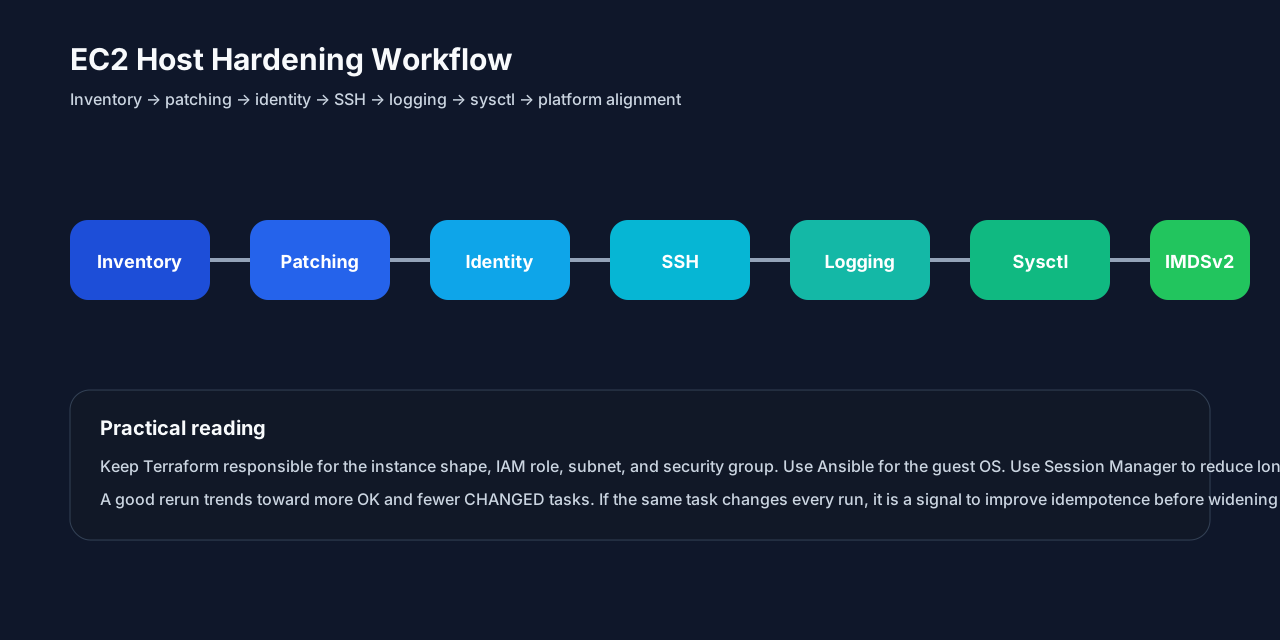
Recommended rollout order
- start with inventory and read-only fact gathering;
- add patching and package baseline;
- add user / key management;
- harden SSH with one canary group first;
- add sysctl, journald, and auditd;
- align the platform with IMDSv2 and Session Manager;
- wire the playbook into CI so the team stops treating host hardening as an occasional manual chore.
Cross-links
- 🐧 Linux Base Image and Host Security Baseline
- 🤖 Ansible Security Baseline and Top 10 Misconfigurations
- 🟧 AWS Security Baseline and Top Misconfigurations
- GitLab System Security Baseline
- 🔐 Secret Management on HashiCorp Vault
Diagram: EC2 host hardening workflow: inventory → patching → identity → SSH → sysctl → logs → platform alignment.