🧱 Terraform Security Scanning and Checkov
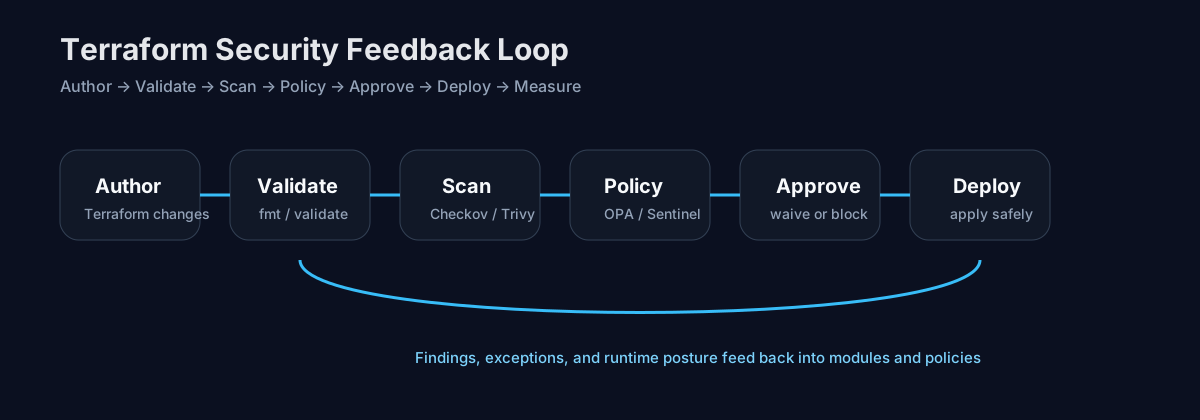
Intro: Terraform moves security-critical decisions into code: identity, networking, storage, encryption, logging, and service exposure. That makes Terraform an ideal place to detect preventable mistakes before the platform team turns them into running infrastructure.
What this page includes
- what Terraform security scanning is and what it can and cannot see
- a practical comparison of common scanner categories
- a deeper walkthrough of Checkov
- a sample report and how to explain findings to engineers
- short remediation guidance and workflow integration notes
Working assumptions
- a failed scan is useful only if it tells the team what is wrong, why it matters, and what to do next
- policy coverage should start with a thin, high-signal baseline and grow over time
Why Terraform needs security scanning
Terraform usually defines some of the most security-sensitive controls in a product environment:
- IAM roles and policies
- network segmentation and internet exposure
- encryption defaults
- logging and audit settings
- secrets handling patterns
- Kubernetes and registry trust paths
- public endpoints, storage policies, and message bus permissions
When these controls are wrong in code, the error is often systemic. One insecure module, copy-pasted widely, can replicate the same weakness across dozens of services.
What Terraform security scanning actually checks
Terraform security scanning is usually looking for four classes of issues:
Misconfiguration
Unsafe or incomplete settings in Terraform resources.
Example: an S3 bucket without versioning or encryption.Weakness in control design
The resource may be syntactically valid, but the control is too weak.
Example: a security group allows0.0.0.0/0inbound SSH.Missing security intent
The code creates infrastructure but omits the protective setting entirely.
Example: CloudTrail exists, but log encryption or retention is missing.Policy violations
The code conflicts with organization-specific rules.
Example: non-production accounts may allow public endpoints, but production may not.
What scanners can miss
Terraform scanning is powerful, but not magical.
Scanners can struggle with:
- values only known at apply time
- logic buried in external modules
- risk that emerges only from runtime behavior
- organization context that is not encoded in the repo
- false confidence when the rule set is incomplete
That is why the best workflow usually combines:
- source scan of
.tffiles - plan scan of
terraform planJSON - optional custom policy checks
- later runtime validation against the deployed cloud account
Common Terraform security utilities
The exact tool choice matters less than the workflow. A practical stack often includes more than one utility.
| Tool | Best fit | Strengths | Watch-outs |
|---|---|---|---|
| Checkov | broad baseline scanner and policy-as-code entry point | strong Terraform coverage, plan scanning, custom YAML/Python policies, good CI ergonomics | can create noise if rule set is not curated |
| Trivy config | unified scanner across Terraform, Kubernetes, Dockerfile, Helm | one CLI for multiple config types, secret + misconfig support in adjacent workflows | less Terraform-specific narrative than dedicated IaC tools |
| Terrascan | policy-driven IaC scanning | simple CLI, Rego/OPA orientation, useful in pipeline enforcement | public docs and release rhythm can feel less active |
| KICS | broad IaC misconfiguration scanning | large built-in query set, CI integrations, OPA/Rego-based internals | remediation guidance quality varies by rule |
| TFLint | linting and provider-specific correctness | useful for style, correctness, provider rules, module hygiene | not a replacement for security scanning |
Why Checkov deserves special attention
Checkov is a strong default when the team wants one tool that can:
- scan raw Terraform files
- scan Terraform plan JSON
- evaluate built-in checks
- load external policies
- support custom checks
- fit naturally into GitLab-style release gates
It is especially useful when the team wants to move from "we run a scanner sometimes" to "we enforce repeatable guardrails in pull requests and pipelines."
Installing Checkov
Local install with pip
python3 -m venv .venv
source .venv/bin/activate
pip install --upgrade pip
pip install checkov
checkov --version
Homebrew install
brew install checkov
checkov --version
Container-first usage
docker run --rm -t \
  -v "$PWD:/work" \
  -w /work \
  bridgecrew/checkov:latest \
  --directory .
Use local virtual environments for developer laptops and containerized execution in CI when you want more repeatable runner behavior.
First scan: source files
checkov -d .
Useful flags:
checkov -d . \
  --framework terraform \
  --compact \
  --quiet \
  --skip-path .terraform \
  --output cli \
  --output sarif \
  --output-file-path console,results.sarif
Scan Terraform plan output
Plan scanning is often more accurate because it includes resolved values and graph context that are not always obvious in raw HCL.
terraform init
terraform plan --out tfplan.binary
terraform show -json tfplan.binary | jq '.' > tfplan.json

checkov -f tfplan.json \
  --repo-root-for-plan-enrichment . \
  --deep-analysis
Use plan scanning when the repo relies heavily on:
- locals and data sources
- dynamic blocks
- external modules
- computed values and variable layering
Sample vulnerable Terraform
See ../snippets/terraform/checkov-demo/main.tf for a deliberately weak example.
That sample includes patterns like:
- publicly reachable SSH
- unencrypted EBS storage
- S3 without versioning
- overly broad IAM policy
- hard-coded cloud credentials
Example Checkov report
See:
Below is the shorter human-readable interpretation.
| Finding theme | What it means | Why it is dangerous | Short fix |
|---|---|---|---|
Security group allows 0.0.0.0/0 to port 22 |
the host is open for inbound SSH from anywhere | increases brute-force and credential abuse exposure; often violates hardening policy | restrict source CIDRs, prefer SSM or bastion patterns, or remove SSH completely |
| EBS volume not encrypted | data at rest can exist without encryption | raises exposure in incident response, snapshot handling, and compliance audits | enable encryption and use KMS-managed keys where required |
| S3 bucket versioning disabled | deletes and overwrites are harder to recover from | weakens recovery from operator mistakes and ransomware-style impact | enable versioning and pair it with lifecycle/retention rules |
IAM policy uses "*" actions or resources |
authorization is too broad | a compromised role can pivot or exfiltrate beyond intended scope | narrow actions, scope resources, add conditions and role boundaries |
| Hard-coded credentials in Terraform | secrets are present in source or plan context | leaks into Git, CI logs, artifacts, or local state | move to environment variables, workload identity, secret manager, or short-lived credentials |
How to explain a finding to an engineer
A scanner result becomes useful when it is translated into this chain:
control → failure → practical risk → remediation
Example:
The security group is open to SSH from the entire internet. That means any exposed instance becomes a password spraying and brute-force target. Even if SSH keys are used, this expands attack surface and often bypasses the team's intended remote access model. Restrict ingress to a controlled source range or remove SSH entirely in favor of Session Manager.
That style avoids two common failure modes:
- scanner-only language with no operational meaning
- dramatic security language with no clear engineering action
Misconfiguration, weakness, and issue: how to use the words correctly
Misconfiguration
A specific setting is wrong or absent.
Example: cidr_blocks = ["0.0.0.0/0"] on an administrative port.
Weakness
The control design is too permissive or too fragile, even if the code "works."
Example: a role trust policy allows far more principals than necessary.
Issue / finding
The scanner's record of a specific policy failure.
Example: CKV_AWS_24 failed for aws_security_group.web.
Using these terms clearly helps triage. Teams can discuss issue count, but the remediation plan should target the underlying weakness, not just close a ticket.
Noise reduction for Terraform scanning
Terraform scanners become shelfware when every merge request produces a wall of low-value output.
Use these tactics:
- start with a baseline policy pack
- gate on high-confidence rules first
- document allowed exceptions
- separate new-code failures from legacy backlog
- use inline skip comments only with rationale
- track recurring skips as technical debt
Check the broader noise-reduction playbook here:
Example Checkov configuration
See ../snippets/terraform/checkov-config.yaml.
Typical ideas encoded there:
- scan only selected frameworks
- skip vendored paths
- emit CLI plus SARIF/JUnit
- keep a small, explicit list of allowed skips
- centralize configuration so local and CI behavior match
GitLab integration example
See ../snippets/terraform/checkov-ci.gitlab-ci.yml.
High-signal pattern:
- run
terraform fmt -check - run
terraform validate - run
checkov - optionally run
terraform plan - scan the plan
- fail the merge request only on selected severities or selected checks
- publish SARIF/JUnit artifacts for later review
A practical maturity ladder
Stage 1 — visibility
Run Checkov in CI, publish artifacts, do not block releases yet.
Stage 2 — narrow blocking
Block only on a small list of critical misconfigurations:
- public admin ingress
- missing encryption on key storage classes
- wildcard IAM where policy forbids it
- disabled logging on critical accounts
Stage 3 — module hardening
Move fixes into shared Terraform modules so teams inherit safer defaults.
Stage 4 — custom policy
Encode organization-specific rules with YAML or Python custom checks.
Stage 5 — posture linkage
Connect scan results to inventory, exposure context, and release evidence.
Decision guide
Use Checkov when you want:
- a broad Terraform baseline
- plan scanning
- custom policy growth
- developer-friendly CLI and CI integration
Pair it with Conftest / OPA or Sentinel when you need more explicit policy control in approval workflows.
For a broader posture layer above raw scanning, see:
Footer note: Terraform scanning is strongest when it becomes part of the delivery path, not a side report nobody owns.