🧭 Runtime Investigation Playbook for Kubernetes and Containers
Intro: Runtime investigation is where Product Security stops being theoretical. The team already has a signal — suspicious shell activity, outbound traffic, a crypto-miner, a strange image, a secret read, or a policy violation. The job is to scope fast, preserve evidence, and avoid destroying the timeline you still need.
What this page includes
- a practical workflow for live Kubernetes and container incidents
- native Kubernetes commands and node-level pivots
- evidence classes to collect before containment changes the scene
- optional runtime telemetry sources such as Falco, Tetragon, KubeArmor, and commercial platforms
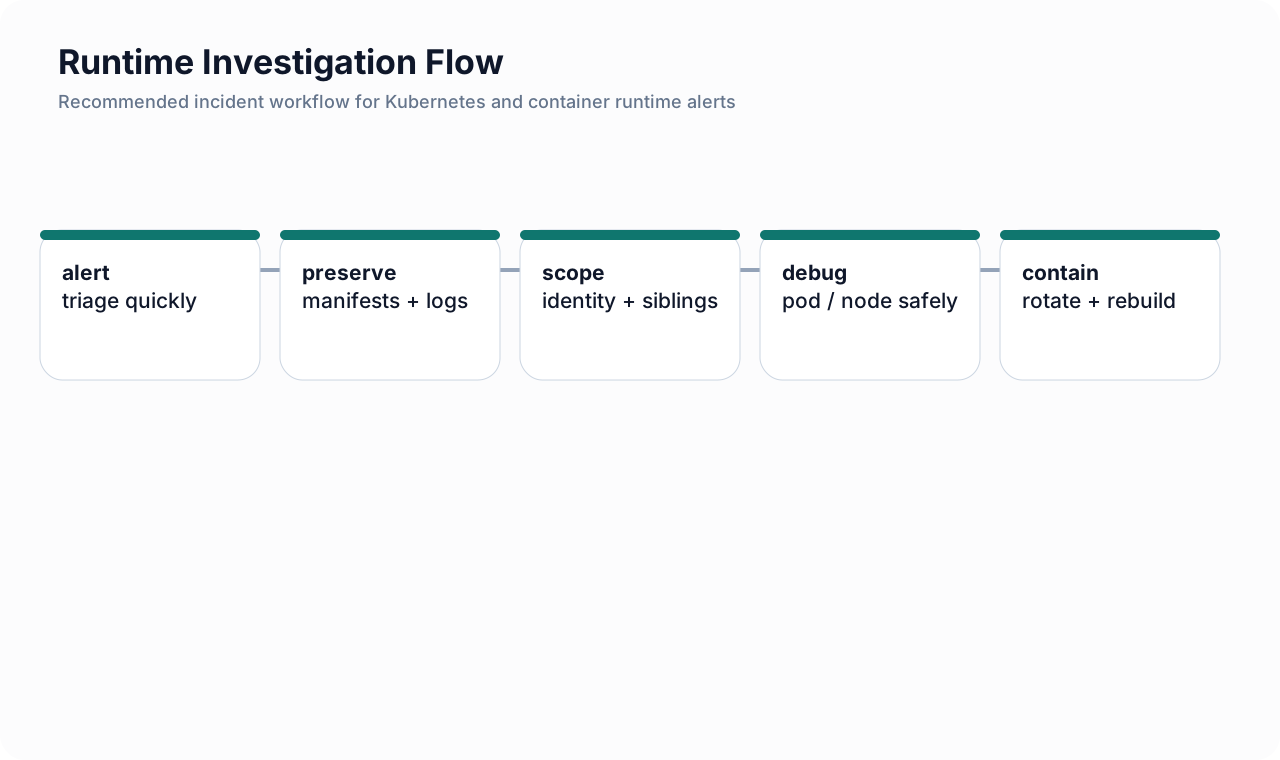 Figure: Recommended runtime investigation flow from alert to containment and recovery.
What counts as a runtime signal?
Typical triggers include:
- shell execution in a production pod;
- execution of binaries from
/tmpor another unusual path; - unexpected outbound connections;
- sudden secret reads or token usage;
- container started privileged or mounted with host paths;
- crash loops after a suspicious image pull;
- policy violations from Falco, Tetragon, KubeArmor, or a commercial runtime product.
Investigation principles
1) scope before you destroy
Do not kill the pod just because it looks bad. If the event is still unfolding, immediate containment may be necessary, but understand what evidence you are about to lose.
2) preserve control-plane evidence first
Control-plane evidence is the easiest to retain and the hardest to fake later:
- workload manifests;
- recent events;
- image references and digests;
- service account identity;
- node placement;
- RBAC bindings and policy state.
3) distinguish three questions
- what happened?
- how far did it spread?
- what credentials or trust paths are now unsafe?
Phase 0 — triage the signal
Use a short severity decision:
| Severity clue | Meaning |
|---|---|
| suspicious exec only, no obvious spread | likely narrow runtime event; preserve evidence first |
| outbound network to unknown infrastructure | assume credential or data theft is possible |
| secret read, service account misuse, or cloud API activity | treat as identity incident, not just pod incident |
| privileged pod, hostPath mount, or node artifacts | treat as potential node-level compromise |
Phase 1 — capture the Kubernetes facts immediately
# basic object inventory
kubectl get pods -A -o wide
kubectl get deploy,statefulset,daemonset -A
kubectl get jobs,cronjobs -A

# describe the suspect pod
kubectl describe pod <pod-name> -n <namespace>

# preserve the pod manifest as seen by the API server
kubectl get pod <pod-name> -n <namespace> -o yaml > suspect-pod.yaml

# record recent namespace events
kubectl get events -n <namespace> --sort-by=.lastTimestamp
What to write down
- namespace, workload owner, and business criticality;
- image name and digest;
- service account;
- node name;
- restart count and timing;
- volumes, especially secret, projected, hostPath, and token mounts;
- security context and capabilities.
Phase 2 — capture logs before the pod changes again
# current container logs
kubectl logs <pod-name> -n <namespace> --all-containers=true

# previous container logs if restart occurred
kubectl logs <pod-name> -n <namespace> --all-containers=true --previous
Look for
- curl or wget to metadata endpoints;
- shell process traces;
- package manager or binary download activity;
- failed or successful secret reads;
- outbound connections to infrastructure the app normally never uses.
Phase 3 — map scope around the workload
Ask whether the pod is isolated or part of a wider blast radius.
# find sibling pods using the same labels
kubectl get pods -n <namespace> --show-labels

# inspect the owning workload
kubectl get deploy <deploy-name> -n <namespace> -o yaml

# inspect service account and permissions
kubectl get sa <service-account> -n <namespace> -o yaml
kubectl auth can-i --as=system:serviceaccount:<namespace>:<service-account> --list -n <namespace>

# list role bindings in the namespace
kubectl get rolebinding,clusterrolebinding -A | grep -E '<service-account>|<namespace>'
Minimum scoping questions
- do other pods use the same image or service account?
- did the same image digest get deployed elsewhere?
- can the service account read secrets or create workloads?
- can the workload reach the cloud control plane through workload identity?
Phase 4 — use safe live debugging methods
Prefer Kubernetes-native debug workflows
Kubernetes supports ephemeral containers and kubectl debug for troubleshooting running workloads and even nodes. That is usually better than modifying the original application image just to investigate. Use it carefully and document the action.
# attach a debug container to a running pod
kubectl debug <pod-name> -n <namespace> -it --image=busybox --target=<container-name>

# create a copy of a pod with a debug image
kubectl debug <pod-name> -n <namespace> -it --copy-to=<pod-name>-debug --image=ubuntu

# debug a node from Kubernetes
kubectl debug node/<node-name> -it --image=busybox
Why this matters
- ephemeral containers help with distroless or minimal images;
- a copied pod can reduce the risk of disturbing the original workload too early;
- node debugging is essential when a container escape or host compromise is suspected.
Phase 5 — node and runtime pivots
Move to the node when you suspect:
- privileged container execution;
- hostPath abuse;
- container runtime manipulation;
- kernel-level or node-level runtime alerts;
- compromise spanning multiple pods on the same node.
Example node-level checks
# inside a node-debug session, pivot into the host filesystem if mounted under /host
chroot /host

# inspect running containers (tool availability varies)
crictl ps
crictl inspect <container-id>
crictl images

# search for suspicious process activity
ps auxf
ss -plant
journalctl --since '2 hours ago'
Host indicators worth checking
- binaries dropped into writable temp paths;
- shell histories or suspicious process parents;
- unknown cron or systemd persistence;
- unusual container runtime configuration changes;
- reverse shells or outbound tunnels.
Phase 6 — identity and cloud pivot analysis
A runtime event becomes a cloud incident when the workload identity is abused.
Kubernetes identity checks
- which service account was mounted?
- was the token projected or legacy style?
- did the pod read Kubernetes secrets or exec into peers?
Cloud identity checks
- AWS: did the workload call STS, IAM, S3, Secrets Manager, EKS, or ECR?
- Azure: did it obtain managed identity or workload identity tokens, or access Key Vault, storage, ARM, or Graph?
- GCP: did it access metadata-backed credentials, Secret Manager, Cloud Storage, Artifact Registry, or IAM?
If the answer is yes, expand the incident scope immediately. The safe assumption becomes: the workload boundary is no longer the incident boundary.
Phase 7 — containment choices
Narrow containment options
- scale a single deployment to zero;
- isolate the namespace with tighter NetworkPolicy;
- revoke or narrow the affected service account or cloud role;
- block image promotion or suspend an Argo CD / CI pipeline;
- quarantine the node if host compromise is credible.
Broad containment options
Use stronger measures when you see evidence of identity expansion, multi-pod spread, or host compromise:
- cordon and drain nodes;
- revoke workload identity trust or service account mappings;
- rotate secrets and tokens the workload could have read;
- freeze release automation until artifact trust is re-established.
Phase 8 — eradication and recovery
Runtime eradication is not “delete the pod and move on.” The minimum bar is:
- rebuild from a known-good image digest;
- remove any malicious manifest or runtime change;
- rotate every credential the workload could have read or minted;
- verify logging and policy controls are enabled before re-enablement;
- document exactly what detection would have shortened the incident.
What a good runtime case file contains
| Evidence class | Examples |
|---|---|
| cluster state | pod YAML, workload owner, service account, RBAC, policy objects |
| workload logs | current logs, previous logs, suspicious stdout/stderr lines |
| runtime telemetry | Falco/Tetragon/KubeArmor alerts, CNAPP/CWPP events, EDR signals |
| node evidence | crictl, process tree, sockets, journal, dropped files |
| cloud control plane | CloudTrail, Activity Log, Entra sign-ins, Cloud Audit Logs |
| deployment context | image digest, registry history, recent rollout timestamps |
| business context | impacted service, data sensitivity, production reach |
Tooling tiers for runtime investigation
Kubernetes-native
Best for:
- first response;
- manifest capture;
- pod/node debugging;
- log and event preservation.
Open-source runtime tools
| Tool | Best use |
|---|---|
| Falco | near-real-time detection using syscall and plugin-based rules |
| Tetragon | deep eBPF-based observability and policy-driven enforcement |
| KubeArmor | workload-level behavior restriction and policy enforcement |
Commercial runtime / CNAPP / CWPP platforms
Use them when you need:
- cross-cluster correlation;
- workload-to-cloud identity graphing;
- policy plus vulnerability plus runtime context in one place;
- case management and reporting for platform teams.
Practical mistakes to avoid
- killing the only good copy of the evidence too early;
- scoping the incident to one pod when the identity path is already compromised;
- trusting “no alert afterward” when logging categories were incomplete;
- rebuilding the workload without rotating credentials;
- forgetting the deployment pipeline as a persistence path.