GitLab CI YAML Deep Dive
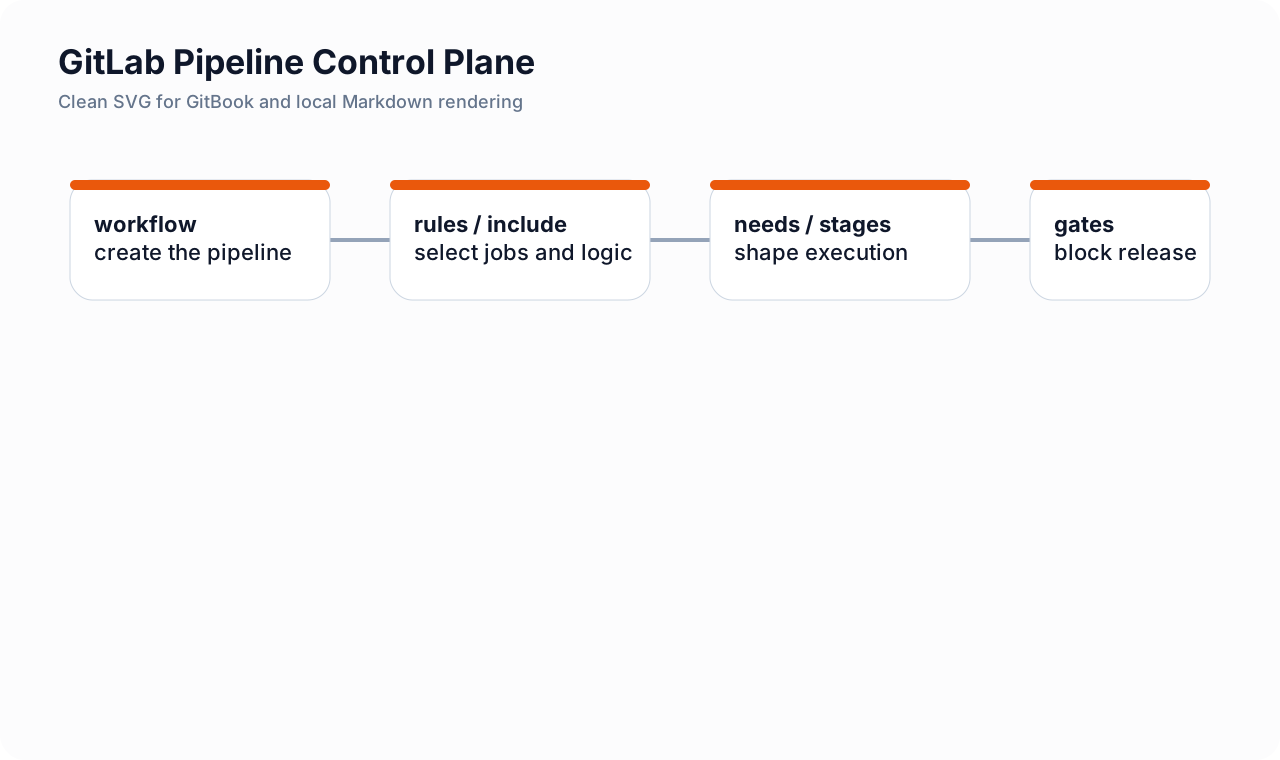
Intro: The main GitLab pipeline file is usually called
.gitlab-ci.yml. Treat it as the control plane for build, test, security scanning, packaging, and release behavior. A strong file explains not only what runs, but also when the pipeline exists, which jobs are included, where they run, and what can block release.What this page includes
- the major top-level blocks that shape a GitLab pipeline
- how
workflow,include,stages,rules, andneedsinteract- a security-first example pipeline with comments and release gating
- cross-links to runner isolation, protected environments, and reusable components
Working assumptions
- pipeline creation, job presence, and job order are separate concerns
- delivery security should be explicit in YAML instead of hidden in runner-side scripts
Mental model
Read .gitlab-ci.yml in this order:
workflowdecides whether a pipeline is created at all.includebrings in shared templates or reusable components.- global keys such as
default,variables, andstagesestablish baseline behavior. - jobs define the actual work.
rulesdecide whether each job exists in the current pipeline.needsrefines execution order into a DAG.- artifacts, reports, environments, and release jobs preserve outputs and shape deploy behavior.
In practice, this means pipeline existence, job existence, and job ordering are three different layers of logic.
Key top-level blocks
| Block | What it does | Security relevance |
|---|---|---|
workflow: |
decides whether to create a pipeline for push, MR, schedule, or tag | blocks duplicate or unsafe pipeline paths |
include: |
imports shared YAML or components | can standardize gates, but must be pinned and reviewed |
default: |
sets base image, tags, retry, or hooks | makes runner use and execution defaults predictable |
variables: |
defines project-level non-secret settings | secrets belong in protected variables or external secret stores |
stages: |
broad execution phases | easy-to-read release order |
rules: |
determines when a job exists | keeps expensive or privileged jobs away from unsafe contexts |
needs: |
creates explicit job dependencies | shortens feedback loops and makes gate relationships clear |
artifacts: / reports: |
preserves outputs and scanner reports | supports evidence, auditability, and GitLab features |
environment: |
models deploy targets | connects jobs to protected environments and approvals |
Broad order vs exact order
stages give the broad order
stages:
  - prepare
  - build
  - security
  - release
  - deploy
This answers the high-level question: what phases exist?
needs give the exact order
semgrep_scan:
  stage: security
  needs: ["build_app"]
  script:
    - semgrep scan --config p/default --json --output semgrep.json
This answers the more precise question: what must finish before this job can start?
A commented example pipeline
# Create only the pipeline types we actually want.
workflow:
  rules:
    - if: '$CI_PIPELINE_SOURCE == "merge_request_event"'
    - if: '$CI_COMMIT_TAG'
    - if: '$CI_COMMIT_BRANCH == $CI_DEFAULT_BRANCH'
    - when: never

# Import reusable scanner and evidence logic from a reviewed internal project.
include:
  - project: platform/ci-templates
    ref: v2.3.1
    file:
      - /security/common-gates.yml
      - /security/release-evidence.yml

default:
  image: alpine:3.20
  interruptible: true
  retry: 1
  tags:
    - ci-general

variables:
  PIP_CACHE_DIR: "$CI_PROJECT_DIR/.cache/pip"
  # Use GitLab protected variables or CI/CD secrets for sensitive values.
  SONAR_HOST_URL: "https://sonarqube.example.com"

stages:
  - prepare
  - build
  - security
  - package
  - release
  - deploy

prepare:
  stage: prepare
  script:
    - echo "Preparing workspace"
  artifacts:
    paths: [.cache]
    expire_in: 1 day

build_app:
  stage: build
  needs: [prepare]
  script:
    - ./scripts/build.sh
  artifacts:
    paths:
      - dist/
    expire_in: 7 days

unit_tests:
  stage: security
  needs: [build_app]
  script:
    - ./scripts/run-tests.sh
  artifacts:
    reports:
      junit: junit.xml
    paths:
      - junit.xml

semgrep_scan:
  stage: security
  needs: [build_app]
  image: semgrep/semgrep:1.84.0
  script:
    - semgrep scan --config p/default --json --output semgrep.json
  artifacts:
    paths: [semgrep.json]

bandit_scan:
  stage: security
  needs: [build_app]
  image: python:3.12-alpine
  script:
    - pip install bandit
    - bandit -r app -f json -o bandit.json
  artifacts:
    paths: [bandit.json]

sonar_gate:
  stage: security
  needs: [build_app]
  image: sonarsource/sonar-scanner-cli:latest
  script:
    - sonar-scanner -Dsonar.qualitygate.wait=true
  artifacts:
    paths: [sonar-report.txt]

security_gate_aggregate:
  stage: security
  image: python:3.12-alpine
  needs:
    - semgrep_scan
    - bandit_scan
    - sonar_gate
  script:
    - python3 snippets/ci/aggregate-security-gate.py
  artifacts:
    paths:
      - security-gate-summary.json
      - security-gate-summary.md
    expire_in: 30 days

package_image:
  stage: package
  tags: [ci-build]
  needs:
    - build_app
    - security_gate_aggregate
  rules:
    - if: '$CI_COMMIT_BRANCH == $CI_DEFAULT_BRANCH || $CI_COMMIT_TAG'
  script:
    - ./scripts/build-image.sh
  artifacts:
    paths: [image-digest.txt]

create_release:
  stage: release
  image: registry.gitlab.com/gitlab-org/cli:latest
  needs:
    - package_image
  rules:
    - if: '$CI_COMMIT_TAG'
  script:
    - glab release create "$CI_COMMIT_TAG" --ref "$CI_COMMIT_SHA" --notes-file CHANGELOG.md

deploy_production:
  stage: deploy
  tags: [ci-deploy-prod]
  needs: [create_release]
  rules:
    - if: '$CI_COMMIT_TAG =~ /^v\d+\.\d+\.\d+$/'
      when: manual
    - when: never
  environment:
    name: production
    deployment_tier: production
  script:
    - ./scripts/deploy-prod.sh
Why this example works
workflowprevents unwanted pipeline creation.includekeeps shared logic centralized and versioned.stagesmake the broad lifecycle readable.needskeeps security jobs parallel where possible.tagsroute privileged jobs away from general runners.environmentattaches the production deploy to protected-environment policy.
rules patterns that matter
Only run on merge requests
rules:
  - if: '$CI_PIPELINE_SOURCE == "merge_request_event"'
Only run on protected refs
rules:
  - if: '$CI_COMMIT_REF_PROTECTED == "true"'
Only run when a language or file type exists
rules:
  - exists:
      - pyproject.toml
      - requirements.txt
Never run on schedules unless explicitly allowed
rules:
  - if: '$CI_PIPELINE_SOURCE == "schedule"'
    when: never
needs for feedback speed
A common anti-pattern is to wait for the entire build stage before running scanners that only depend on one build artifact.
Better pattern:
semgrep_scan:
  stage: security
  needs: [build_app]
This makes the pipeline behave more like a graph and less like a rigid waterfall.
Where runner choice belongs
Use YAML to make runner routing explicit with tags or scoped runners, but keep the trust decision outside the file too.
Read next:
Reuse without hiding behavior
A project should still be able to explain its release path even when it consumes shared pipeline logic.
Read next:
Cross-links

Seven useful GitLab CI features that often clean up pipelines
These are not “security features” in isolation, but they frequently improve delivery hygiene and reduce weird CI behavior that later becomes security debt.
1) resource_group
Use it when only one deploy or stateful action should run at a time.
deploy_prod:
  stage: deploy
  resource_group: production
  script:
    - ./deploy.sh
Good fit:
- production deploys
- schema migrations
- promotion steps that must not overlap
2) allow_failure:exit_codes
Useful when one tool exits with a special code for “findings exist” versus “the job is broken.”
secret_scan:
  stage: security
  script:
    - ./scan-secrets.sh
  allow_failure:
    exit_codes: [3]
Use carefully. It should make semantics clearer, not hide real failures.
3) pipeline input ergonomics with variable options
Useful for manual or scheduled pipelines where reviewers should choose from a known set of targets rather than type free-form values.
4) !reference
Useful when several jobs share small fragments such as common rules, before_script, or scanner wrappers.
5) coverage
Still valuable for teams that want merge-request-visible test coverage without building a custom parser path for everything.
6) parallel and parallel:matrix
Useful for large test or validation fans, especially when different providers, regions, or service groups must be checked independently.
7) needs with artifact awareness
Useful when you want faster DAG execution without accidentally pulling every artifact from previous stages.
Security-minded cautions
- do not use “clever YAML” to hide deploy logic reviewers cannot understand;
- keep privileged jobs visibly separate from low-trust jobs;
- be explicit about artifact flow when using
needs; - do not let pipeline optimization silently bypass review, evidence, or approval steps.
Seven high-value GitLab YAML features that often stay underused
resource_group
Use it when only one job should mutate a shared target at a time.
tf_apply:
  stage: deploy
  resource_group: terraform-prod
  script:
    - terraform apply -auto-approve
allow_failure:exit_codes
Useful when a tool has one exit code for “soft issue” and another for real breakage.
smoke_check:
  script: ./smoke.sh
  allow_failure:
    exit_codes: [42]
parallel and parallel:matrix
Useful when test or build expansion is predictable and mechanical.
!reference and reuse patterns
Useful when one small piece of logic should be reused consistently across jobs or included files.
coverage
Useful when you want test-coverage signal visible in merge requests without building custom parsing around it.
variables with constrained manual choices
Useful for safer manual runs where the operator should pick from known-good values instead of typing arbitrary free-form strings.