🧪 DevSecOps-Studio — Virtual Lab Environment for Learning DevSecOps
Intro: Some learning platforms teach concepts and some goat environments teach specific attack paths. DevSecOps-Studio sits in between: it is a preassembled virtual training environment that bootstraps a broad DevSecOps lab on a workstation using Vagrant, VirtualBox, and Ansible.
What this page includes
- what DevSecOps-Studio is and why it is still worth knowing;
- how to install and launch it;
- what is included in the environment;
- what is clearly legacy today and what to swap for a 2026-ready study path;
- how to combine it with the rest of this knowledge base and adjacent lab collections.
Why this page belongs in the self-learning track
DevSecOps-Studio is valuable because it solves a very specific training problem:
- a team wants a single local virtual environment to demonstrate many parts of the DevSecOps lifecycle;
- the environment should be relatively self-contained;
- the learner wants more than one isolated goat app and less than a full enterprise platform build-out.
That makes it useful for:
- workshops;
- internal enablement sessions;
- security champion onboarding;
- demos of CI, SAST, DAST, compliance, and secrets concepts in one place;
- “show me the whole pipeline” training before moving into deeper specialty labs.
What it is
DevSecOps-Studio is an open GitHub project that describes itself as a virtual environment to learn and teach DevSecOps concepts. It bootstraps a training setup with Vagrant, VirtualBox, and Ansible, and aims to reduce the time and friction needed to stand up a demo/training environment.
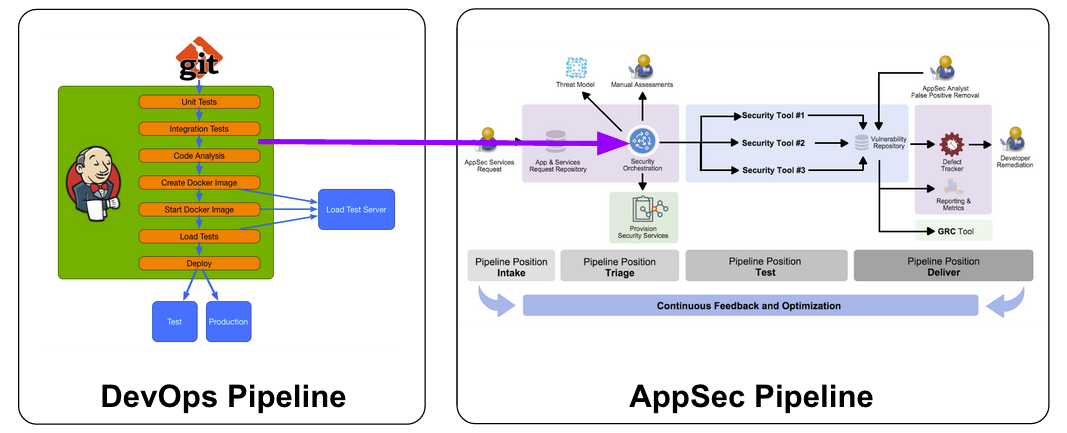
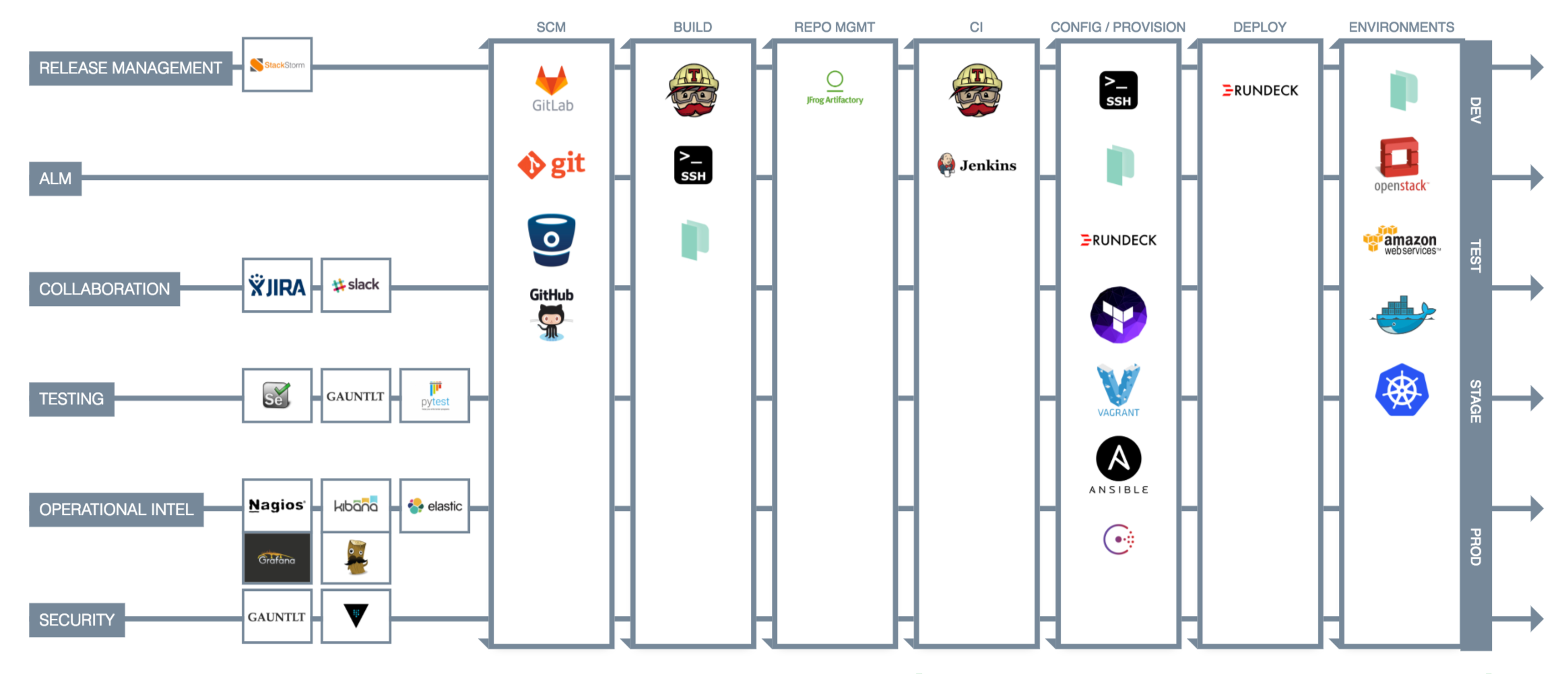
Official project visuals
These official visuals are helpful for understanding the idea behind the environment:
Why it is still useful in 2026
Even though the project stack is dated, the environment still has value because it teaches several durable ideas:
- how a local DevSecOps lab can be bootstrapped reproducibly;
- why learners benefit from having multiple controls in one sandbox;
- how to practice moving from code → scan → build → test → deploy → review;
- how to compare older DevSecOps tools with the tools teams are more likely to use today.
It is best treated as a training distribution or historical baseline lab, not as a modern production reference architecture.
What the original environment includes
According to the project README, DevSecOps-Studio includes:
- PenTest toolkit: Nmap, Metasploit;
- static analysis tools: Brakeman, Bandit, FindBugs;
- dynamic analysis tools: OWASP ZAP, Gauntlt;
- hardening: DevSec Ansible OS Hardening;
- compliance: InSpec;
- SCM / CI: GitLab, GitLab CI, Jenkins;
- configuration management: Ansible;
- monitoring and logging: ElasticSearch, Logstash, Kibana;
- container technology: Docker;
- cloud utility: AWS CLI.
This broad tool mix is exactly why the environment is useful as a teaching artifact.
Honest legacy vs current guidance
This is where judgment matters.
Still useful ideas
These parts are still useful as concepts and still map well to a 2026 learning journey:
- Bandit for Python learning and local SAST intuition;
- Brakeman for Rails/AppSec learning;
- OWASP ZAP for DAST and API/web testing;
- InSpec as an example of compliance-as-code / audit assertion thinking;
- Ansible as a repeatable hardening and configuration engine;
- GitLab / Jenkins as CI control planes to learn trust boundaries;
- ELK as a log-ingestion and visibility baseline.
Clearly dated or legacy parts
These should be treated as historical context and modernized in your study path:
| Original component | Why it is legacy now | Better 2026 learning replacement |
|---|---|---|
| Ubuntu Xenial 16.04 | long out of standard support | Ubuntu 22.04/24.04 lab base or containerized tooling |
| Python 2 | end-of-life | Python 3 only |
| FindBugs | retired | SpotBugs, Semgrep, CodeQL, language-native analyzers |
| Gauntlt | largely historical in modern pipelines | OWASP ZAP baseline/API scan, k6 for load, focused DAST harnesses |
| heavy VirtualBox-first local VM workflow | still works, but dated for many teams | containerized labs, Kind/K3d, cloud sandboxes, Codespaces/devcontainers where appropriate |
| old GitLab/Jenkins training defaults | fine for concepts, not a 2026 secure baseline | modern GitLab CI/GitHub Actions plus hardened runners |
Recommended use pattern in 2026
Use DevSecOps-Studio in three phases.
Phase 1 — Use it as a concept lab
Learn these ideas first:
- where SAST fits;
- where DAST fits;
- what “security in the pipeline” looks like;
- what secrets scanning and compliance checks look like;
- what a local full-stack training environment feels like.
Phase 2 — Modernize the toolchain mentally
As you work through the environment, translate each control into a modern equivalent.
| Training concept | Older example in Studio | Modern examples to learn next |
|---|---|---|
| local/static analysis | Brakeman, Bandit, FindBugs | Semgrep, CodeQL, SpotBugs, SonarQube for IDE |
| dependency/container scanning | ad hoc legacy tool mixes | Trivy, Grype, Syft, Dependency-Track |
| DAST | ZAP, Gauntlt | ZAP Baseline, ZAP API Scan, Automation Framework |
| hardening | DevSec Ansible OS Hardening | Ansible hardening + CIS-aligned container/Kubernetes baselines |
| CI control plane | GitLab / Jenkins | GitLab CI, GitHub Actions, hardened runners |
| runtime and container security | mostly historical baseline thinking | Falco, Tetragon, StackRox/RHACS, Kubescape |
| signing and trust | not central in older stacks | Cosign, attestations, provenance, SLSA-aware flows |
Phase 3 — Move into specialty labs
After the broad-environment phase, move into the deeper labs already present in this knowledge base:
- CI/CD Goat — Pipeline Security Lab
- API Definition Conformance Lab — OpenAPI, Contract Linting, AuthZ Checks, and CI Validation
- Cloud Compliance Scan Lab — Scan → Triage → Fix → Codify
- Containment and Eradication Automation Lab
- Kubernetes Goat — Cluster Security Lab
- OWASP Juice Shop — Web and API Lab
Installation (original workflow)
Minimal prerequisites from the project
The original repository expects:
- Vagrant
- VirtualBox
- Ansible
The README also lists baseline hardware roughly as:
- at least 4 GB RAM for the virtual machines;
- 60 GB disk;
- Intel i3-class CPU or better.
Original quick-start
git clone https://github.com/teacheraio/DevSecOps-Studio.git
cd DevSecOps-Studio
ansible-galaxy install -r requirements.yml
vagrant up
Check the machine layout before bootstrapping
cd DevSecOps-Studio
vagrant status
If you want to customize the environment
The project README suggests editing machines.yml before running the full bootstrap.
Example: original dependency setup on Linux (historical)
These are representative of the historical install steps shown in the README and are useful only as context.
sudo apt update
sudo apt install virtualbox
sudo apt-get install vagrant python2 python2-pip
pip install ansible
Why not to copy that blindly today
Do not treat those commands as a 2026 baseline. They reflect the historical state of the project and include Python 2 and an old Ubuntu-era VirtualBox path.
Safer modernized setup path
If you still want to use DevSecOps-Studio today, the safer learning path is:
- use a disposable workstation or a dedicated training VM;
- install a current Vagrant and VirtualBox only if your host policy allows it;
- run the project in an isolated environment;
- keep it off production credentials and off corp-managed admin endpoints;
- expect some drift and breakage due to old provisioning assumptions;
- replace legacy exercises with current tools where possible.
Practical safety recommendations
- do not connect the training environment to sensitive cloud accounts;
- use throwaway or sandbox credentials only;
- assume older images and packages may contain vulnerable software;
- snapshot the workstation or VM before first boot;
- teardown the environment when the exercise is done.
Suggested study order using DevSecOps-Studio + modern tracks
A good self-learning sequence is:
- DevSecOps foundations — understand the overall pipeline model.
- Local SAST and developer-side feedback — Bandit/Brakeman historically, then Semgrep/CodeQL today.
- Secrets and dependency hygiene — Gitleaks, Trivy, SCA flows.
- Docker and image review — image hardening, privilege reduction, scanning.
- CI control plane trust — GitLab/Jenkins roles, tokens, runners, artifacts.
- DAST and authenticated testing — ZAP baseline, API scan, contexts/sessions.
- Runtime and Kubernetes — Falco, Tetragon, RHACS/StackRox, policy enforcement.
This ordering matches well with the more modern course shape used by programs like INSECA: SAST → ASOC/vulnerability management → dependencies → Docker → SCM/CI → secrets → runtime/policy/cloud-native controls.
How to use ORDA lab collections next to this environment
CyberOrda’s public DevSecOps and Labs collections are useful as a companion discovery layer, especially when you want to extend from one broad local environment into:
- vulnerable web apps;
- XSS / XXE / request smuggling labs;
- Android and iOS vulnerable apps;
- containerized practice targets.
That is a good way to avoid overloading DevSecOps-Studio with too many goals.
What to document while you learn
Do not use the environment only as a demo. Document the following for each exercise:
- what control you were trying to learn;
- whether it was build-time, deploy-time, or runtime;
- what older tool or pattern the environment used;
- what you would use in a 2026 production-oriented stack instead;
- how the control would integrate with your own CI/CD and platform architecture.
High-value takeaways
The biggest value of DevSecOps-Studio is not “this exact environment is modern.”
The value is that it teaches:
- why broad, reproducible training environments matter;
- how DevSecOps controls sit across the software lifecycle;
- how to map older well-known tools to modern replacements;
- how to turn theory into a repeatable self-learning track.
Related pages
- Product Security Ramp-Up Tracks
- Vulnerable Learning Labs and Goat Environments
- Secure Coding Training Platforms for Developers
- Security Review Checklists and Cheat Sheets
- GitLab CI/CD Modern Security Patterns
- OWASP ZAP DAST Modernization Patterns
---Author attribution: Ivan Piskunov, 2026 - Educational and defensive-engineering use.